Photograph the bag, rate the coffee
My home goes through about a bag of coffee a week, and my memory for taste is fleeting. I can only justify holding onto so many old bags before my wife accuses me of being a hoarder, and once a bag is in the recycling I no longer recall the aroma or the notes. Roastbook is the app I wanted for both problems: photograph a bag when I open it, let the phone pull out the details, and record what I thought once I’ve brewed it. The notes are the part I can’t re-create.
Most of my bags come from a weekly subscription (Fellow Drops), and the highs are high but the lows are low. I’ve put limits on my caffeine as I’ve gotten older, so quality trumps quantity, and remembering which bags were worth it is how the next order gets better. A tool for that is something I’ve always wanted and could never find, so I built it.
The other reason is the same one behind the local models in my homelab: I wanted to understand what the small models that now ship on the phone itself can and can’t do. I’ve had a Pixel in my pocket for as long as they’ve been produced and work with plenty of other manufacturers’ devices through work, so the app also had to hold up across several families of hardware, each with its own on-device model (while also supporting those without any).
Reading a coffee bag is a decent test. I photograph the front and the back when I open a bag and the app fills in roaster, origin, process, varietal, roast level and tasting notes on its own, plus the bag’s own text verbatim. There is no review form. ML Kit’s text recognition reads the photos at full resolution, then Gemini Nano, the model built into the phone, gets both the images and that text. On my phone and the build I tested, Nano took in each image as something like 256 tokens, which loses the small dense print on a pamphlet entirely; text recognition catches it in about half a second. Text alone loses the layout, which is how a website becomes a producer and a varietal becomes a region.
Together they got every field right on two of the three coffees I used to test the design. On the third they got everything except the weight, because text recognition misread “9OZ (255G)” and the model believed it. That’s three coffees on one phone, which is exactly as much as it proves.
The models take a few seconds and their output is non-deterministic. I had to put a refresh button in the interface, because sometimes what came back from a bag was incomprehensible or incomplete and the same photos would succeed on the next run. I have a newfound respect for apps that use these tools in large-scale production, where the quality bar varies on factors entirely outside the developer’s control.
The rating has five dimensions and only three of them count. Aroma, flavor and finish average into a score; acidity and body are recorded and sortable and never touch it, because a light-bodied, low-acid coffee is a style rather than a failure and shouldn’t lose points for it. History is a list of tinted rows, one square bag photo each, with the score beside it.
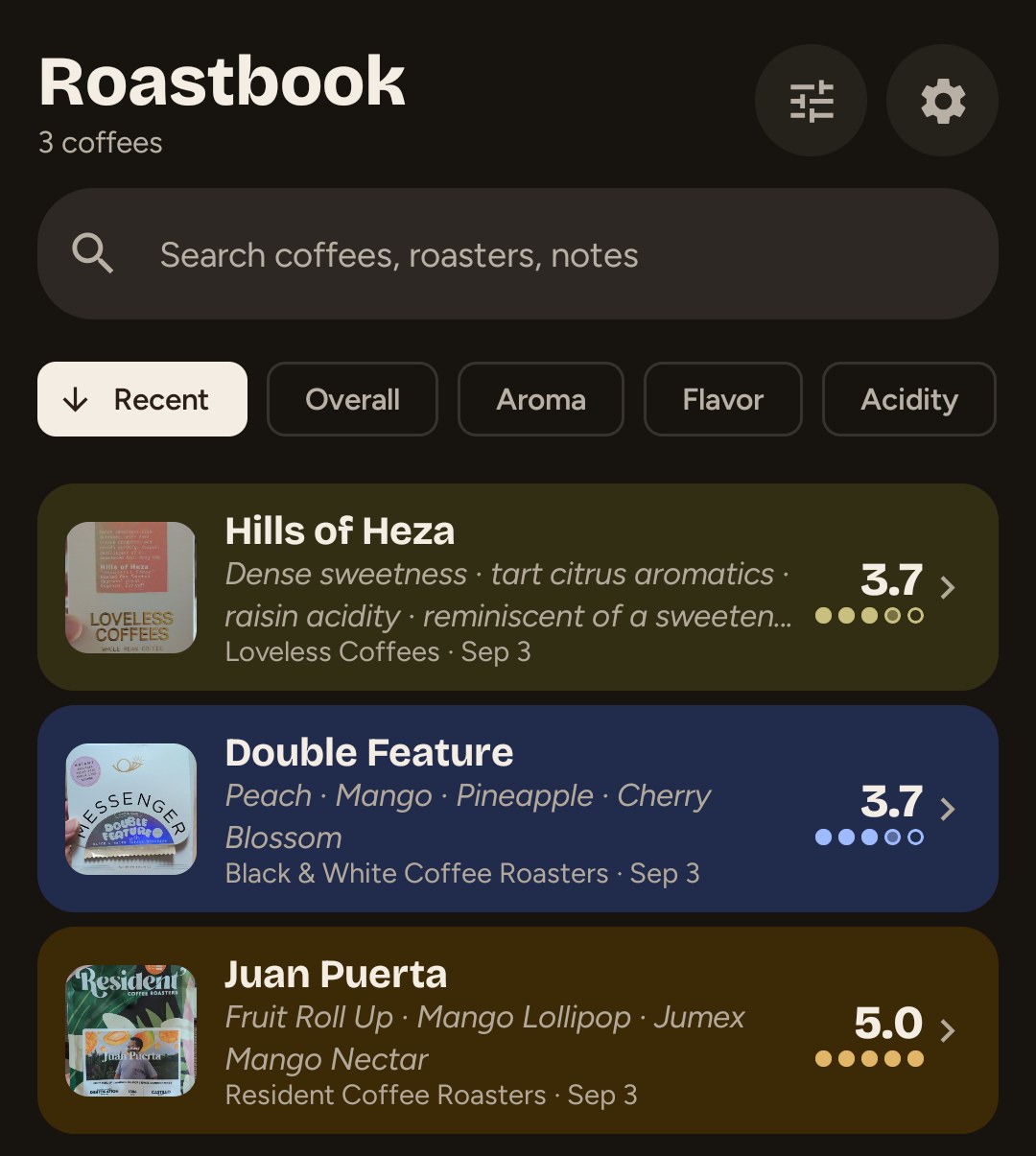
The record lives in the phone’s own database and photo files, and nothing in the app talks to my infrastructure; there is no server of mine behind it. A managed cloud backend was the default plan. I dropped it the same day because I didn’t want an ongoing hosting bill that grew with other people’s use. If a phone’s built-in model isn’t available, the app can download an open model to run on the phone itself, and anyone who wants a steadier read can enter their own cloud API key in Settings, in which case the bag photos and text go to that provider. The bill for all this is no live sync to a tablet.
Local also means the notes are only as safe as their backup, and that is the point of keeping them: the bag is already gone. I change phones every couple of months for work, so I’ve become deliberate about where an app’s data lives, who controls it, and how it comes back. Roastbook has two answers today. Android’s own automatic backup carries the database and small thumbnails to a new install. A daily zip to a folder the user picked carries everything, full-size photos included, with the newest seven kept. Restoring a zip checks it before touching anything, and an interrupted restore is rolled back on the next start instead of leaving half the old notes and half the new.
The folder pick taught me something. I had intended the default to be Downloads, and on modern Android the system picker refuses to grant the Downloads root, in those words, to protect your privacy. I believe a good product should keep its technical complexity out of the way of people who don’t benefit from it, but how someone organizes the files on their phone is very personal. The app now asks people where they want their backups.
The full loop of setup, backup, deleting the app and restoring from the zip has run on an emulator in both debug and release builds. On my own phone I’ve restored my real coffees from a zip I made by hand, and the daily job is armed. Before I’d trust these notes to survive a phone change for anyone else, two things still have to work: a restore from a zip the scheduled job wrote, and a bag read on hardware that isn’t a Pixel. Those two come before the app goes on Play.